CodeIgniter Wizard CodeIgniter Wizard
v3.6.4 · Mac App Store →
macOS · Mac App Store · PHP · CodeIgniter 4

Your schema already
describes the app.
Let CI Wiz write it.

Point it at a MySQL or MariaDB database. Tick the columns that matter. Get a running CodeIgniter 4.6 app — entities, models, controllers, routes, validation, Bootstrap 5 forms, DataTables grids, Shield authentication and translations. The code a careful developer would have written, minus the three days.

Version 3.6.4 MySQL & MariaDB CodeIgniter 4.6 + Shield Bootstrap 5 One-time purchase
CodeIgniter Wizard publishing a CodeIgniter 4.6.3 CRM with Shield authentication, next to the generated login screen running in Safari
A four-table CRM with Shield auth — generated, published, running
The one screen that does the work

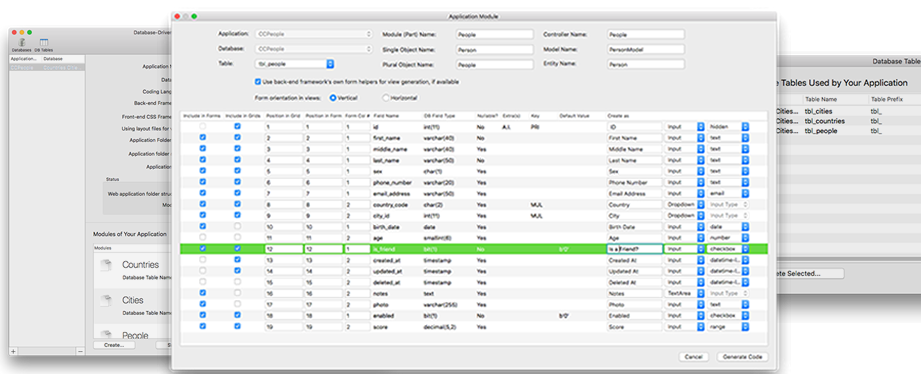
The module editor, up close

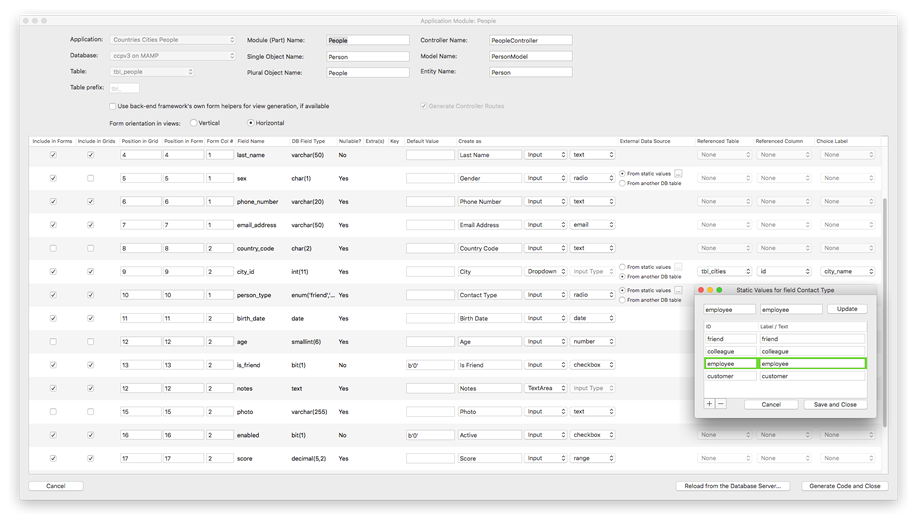
CodeIgniter Wizard's Application Module editor: every database column with its form control, grid position, validation and external data source
01 · Point and click

Pick a table. Every column arrives with a sensible default: which ones appear in forms, which in list views, in what order, in how many columns.

02 · Constrained on purpose

A char(1) can't become a textarea. A dropdown only appears once it has a data source. The UI refuses the mistakes you'd otherwise debug later.

03 · enum, FK, static values

Foreign keys become joined selects with human labels. enum columns become radio groups. Anything else takes key-value pairs you type in — no schema change required.

How it works

Four steps from schema to running app

STEP 1

Register the database

Add the credentials for a MySQL or MariaDB schema — local, on your network, or at your host. Once per schema; the password goes into the macOS keychain, not a config file.

STEP 2

Shape the module

Select a table and tune it column by column: form controls, grid columns, labels, joins, validation, uploads. Table-name prefixes and camelCased columns are recognised for you.

STEP 3

Publish the code

Write one module or the whole application to your web folder: entities, models, controllers, routes, views and layout templates. Change the schema later and re-publish only what moved.

STEP 4

Run it, then own it

Start the app and you get a dashboard, a sidebar, CRUD screens and auth. From there it's ordinary CodeIgniter 4 code — open your IDE and build on top of it.

What lands in your project folder

Everything a module needs. Nothing you'd delete.

Generated per module
  • Entity classes with PSR-compliant namespaces
  • Model classes with allowed fields, casts and joins
  • Controllers, RESTful resource routes, named routes
  • Bootstrap 5 form views with full server-side validation
  • DataTables list views, AJAX pagination, search, sort
  • Shield login, registration, profile, password reset, login links
  • Admin dashboard and sidebar built from your modules
  • File and image upload handling, front and back end
  • Language files, plus a DOC.md an AI agent can read
  • CSRF and XSS protection, try/catch and logging throughout

Code a human would sign

Loosely coupled, object-oriented, framework-idiomatic. No generator runtime to install, no cross-cutting glue to unpick — swap the template, lift a helper, keep the parts you want.

Iterative, not one-shot

Your work is saved as you go. Add a column next month, re-open the module, re-publish. CI Wiz notices what changed in the schema and suggests the update.

Auth without the weekend

Authentication and authorization — CodeIgniter Shield included — with e-mail templates, activation and reset flows, and a ready-made user-groups CRUD module.

The output, full size

This is what it hands you

A generated CodeIgniter 4 list view: DataTables grid with search, sorting, pagination, edit and delete actions

Responsive views, server-side processing on the grids, flash messages, breadcrumbs and a sidebar — generated, not templated by hand. Try the live sample app, or read its source on GitHub.

Open the live sample app Source on GitHub How it was built →
CodeIgniter Wizard · In Action

Watch it build something real

All features →
Build a CRM App in 10 Minutes with Local AI and CodeIgniter Wizard
11:21
Build a CRM app in 10 minutes with local AI & CodeIgniter Wizard
End-to-end demo: auth, i18n and file uploads
End-to-end demo: authentication, i18n and file uploads
Application module generator walkthrough
Inside the application module generator
By the way

The page you are reading right now? Its back end was generated with CodeIgniter Wizard.

Ozar.net runs on a CodeIgniter 4 back end whose modules, models, controllers and admin screens came out of this app — then got a hand-written front end on top. That is the workflow it is built for.

Get the app

One-time purchase. Then never type CRUD again.

One purchase, unlimited projects, licensed by Apple. Whatever you generate is yours to sell — royalty-free, no attribution. Point it at a schema this afternoon and ship the admin app your client asked for.

Get it on the Mac App Store Read the full feature list

Version 3.6.4 · macOS 12 or later · One-time purchase · Family Sharing · no data collected
Generates CodeIgniter 4.6.x for PHP 8.3+ with MySQL / MariaDB 5.5+ · credentials stored in the macOS keychain

Keep reading

Related resources

Features & screenshots

Code generation, database handling and code quality — every capability, with the screen that proves it.

Explore the features →

Documentation

Setup, module options, publishing, and what each generated file is responsible for.

Read the docs →

F.A.Q.

Licensing, supported PHP and CodeIgniter versions, upgrades, and what CI Wiz deliberately doesn't do.

Read the answers →

Support & contact

A question about your schema, a bug, or a feature you need? Write to the developer directly.

Get in touch →